Part I
Be found.
Customers can only choose you if they find you, understand you, and trust you in the first few seconds. Part I covers your website, your words, your service pages, Google search, AI search, your Google Business Profile, and how to tell what's working.
01 · Be found
A website that sells
Your website is the place every other channel sends people. It has one job: turn a visitor into an enquiry.
What good looks like:
- In five seconds, a visitor knows what you do, where you work and how to get in touch.
- It works properly on a phone, because that is where most people will see it.
- Every page has one clear next step: call, book, or ask for a quote.
- There is proof: photos of real jobs, reviews, and the names of places you've worked.
- Your prices, or how you price, are easy to find.
- It loads fast and looks cared for.
Why bother
Word of mouth, Google, your Business Profile, ads and social posts all send people to the same place. If the website is unclear, every one of those channels works less well. A small site is fine, as long as it answers the questions a customer has before they are willing to contact a stranger.
How to do it
Start with the top of your homepage. It should say who you help, what you do and where, in one sentence, with a button next to it.
“Quality solutions for all your needs.”
“Heat pump installation and servicing in Bergen and Askøy. Fixed prices, work guaranteed for five years. Get a quote within a day.”
Then make sure a visitor can answer these questions without scrolling for long:
- What exactly do you do, and what don't you do?
- Where do you work?
- What does it roughly cost, and how do you price?
- What have you done before? (photos, examples, reviews)
- What happens after I get in touch?
Give each service its own page (section 3), keep contact details on every page (section 8), and check the site on your own phone once a month.
- 01The promise and one buttonWho you help, what you do, where. "Get a quote".
- 02ServicesEach one linking to its own page.
- 03ProofPhotos of real jobs and reviews.
- 04How it worksWhat happens after they get in touch, and prices.
- 05ContactPhone, form and area — on every page.
Common mistakes
- A slider of stock photos where the promise should be.
- "Contact us" as the only way in, with no phone number or price guide.
- An About page that talks about the company instead of the customer's problem.
- A site nobody has touched in two years, with old prices and an old phone number.
02 · Be found
Words that convert
Good copy sounds like you on your best day: clear, specific, and about the customer's problem.
What good looks like:
- Every headline says what the customer gets, not what you are.
- You use the words your customers use ("leaking tap", not "sanitary installations").
- Each page makes one promise and backs it up with proof.
- Buttons say what happens next: "Get a quote", "Book a visit", "Call Kari".
- Short sentences. No jargon. Nothing you couldn't say out loud.
Why bother
People skim. They read headlines, buttons and the first line of a paragraph. If those don't say what they need, they leave. Specific words also help Google and AI search understand exactly what you offer and where — which is how you get found for the jobs you want.
How to do it
Rewrite one page at a time, starting with the homepage and your most profitable service.
- Write down the customer's problem in their words. Look at old enquiry emails and reviews — the language is already there.
- Lead with the outcome. What is different for the customer after you've done the job?
- Add proof next to every claim. A number, a photo, a review, a guarantee.
- Remove anything that could be on a competitor's site. "Quality", "professional" and "customer-focused" say nothing.
- End with one clear action.
“We are a professional cleaning company with many years of experience delivering quality services to businesses.”
“Office cleaning in Oslo, done before 7 am so your team never sees us. Same cleaner every week. Cancel any time.”
03 · Be found
Service pages that bring work
One page per service — and per area, if you work in several — turns searches into enquiries.
What good looks like:
- Every service you want more of has its own page.
- Each page answers: what's included, what it costs or how you price, how long it takes, where you do it, and what happens next.
- Real photos and a review from a customer who bought that service.
- A short FAQ with the questions customers actually ask.
- A clear button to get a quote or book, at the top and bottom.
Why bother
Someone searching "bathroom renovation Stavanger" wants a page about bathroom renovations in Stavanger — not a homepage that lists twelve services. Specific pages rank better on Google, get quoted by AI search, and convert better because the visitor sees exactly what they came for.
How to do it
- List your services by value. Start with the jobs that are most profitable or that you want more of.
- Build one page per service using the same structure every time: promise, what's included, price guide, process, proof, FAQ, action.
- Add area pages only where you really work , and make each one genuinely local — jobs you've done there, travel time, local details. Copying the same text with a new town name helps no one.
- Link them together: from the homepage, from related services, and from blog posts.
“Services: plumbing, heating, bathrooms, drains.”
A page called "Bathroom renovation in Stavanger" with a fixed-price guide from a set amount, a four-step process, twelve photos of finished bathrooms, three reviews, and "Book a free visit".
- Promise + buttonBathroom renovation in Stavanger
- What's includedAnd what isn't
- Price guideFixed price or how you price
- How it worksSteps and timing
- ProofPhotos and reviews for this service
- FAQQuestions from real enquiries
- ActionBook a free visit
04 · Be found
Show up on Google
SEO is making sure Google understands exactly what you do and where — and trusts you enough to show you.
What good looks like:
- Your site is connected to Google Search Console and you look at it once a month.
- Every page has a clear title and description that says the service and the place.
- You rank for your main services in your area, and you know which searches bring visitors.
- You publish a useful article when customers keep asking the same question.
- Your business name, address and phone number are the same everywhere online.
- The site is fast, works on mobile and has no broken pages.
Why bother
When someone searches for what you do in your area, they choose from the first handful of results. The goal is to be the obvious local answer for the jobs you want, and beating national chains is rarely necessary for that. That is more achievable than most owners think, because most local competitors never do the basics.
How to do it
- Connect Google Search Console. It's free and shows which searches you appear for, how often people click, and which pages have problems.
- Fix the basics on every page. A title like "Heat pump servicing in Bergen | Company name", one main heading, a short description, and pictures with sensible names and descriptions.
- Find your quick wins. In Search Console, look for searches where you already appear on page one or two but few people click. A better title or a small section on that page often moves them up.
- Write for real questions. When customers keep asking "how long does a bathroom renovation take?" or "do I need a permit for a heat pump?", answer it properly in an article and link it to the service page.
- Keep your details consistent everywhere: website, Google Business Profile, directories and social profiles.
“Home”
“Electrician in Trondheim — EV chargers, fuse boards and repairs | Lys & Kraft”
lysogkraft.no › elbillader
Electrician in Trondheim — EV chargers, fuse boards and repairs | Lys & Kraft
★★★★★ 4.9 · 212 reviews
Certified electricians across Trondheim. EV charger installed from a fixed price, usually within a week. Get a quote today.
- ATitle — service + place, from your page title
- BStars — from reviews and structured data
- CDescription — proof and a next step
Common mistakes
- Pages titled "Home", "Services" and "Contact".
- Writing articles about topics no customer searches for.
- Stuffing the same keyword into every sentence.
- Never checking Search Console, so problems go unnoticed for months.
05 · Be found
Be the answer in AI search
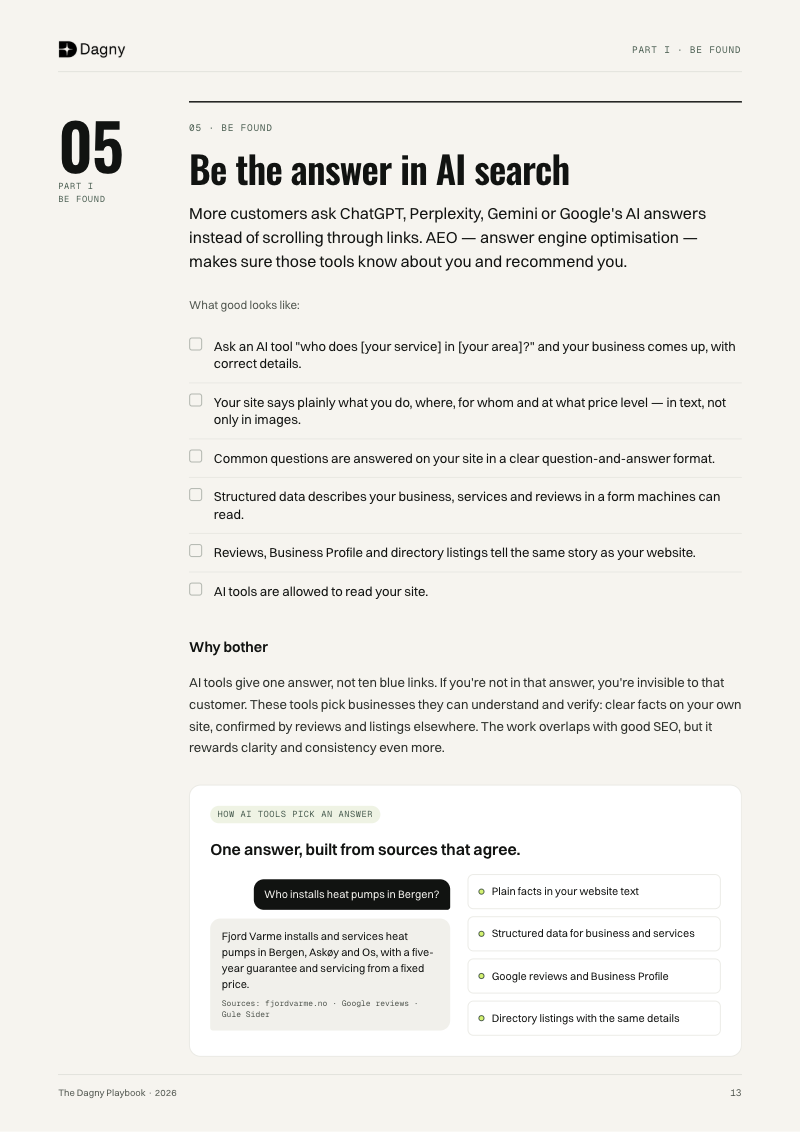
More and more customers ask ChatGPT, Perplexity, Gemini or Google's AI answers instead of scrolling through links. AEO — answer engine optimisation — is making sure those tools know about you and recommend you.
What good looks like:
- When you ask an AI tool "who does [your service] in [your area]?", your business comes up, with correct details.
- Your website states plainly what you do, where, for whom, and at what price level — in text, not only in images.
- Common questions are answered on your site in a clear question-and-answer format.
- Your site includes structured data that describes your business, services and reviews in a form machines can read.
- Your reviews, Google Business Profile and directory listings tell the same story as your website.
- AI tools are allowed to read your site.
Why bother
AI tools give one answer, not ten blue links. If you're not in that answer, you're invisible to that customer. These tools pick businesses they can understand and verify: clear facts on your own site, confirmed by reviews and listings elsewhere. The work overlaps with good SEO, but it rewards clarity and consistency even more.
How to do it
- Ask the AI tools yourself. Once a month, ask ChatGPT, Perplexity and Google the ten questions your customers would ask ("best heat pump installer in Bergen", "who can service a Mitsubishi heat pump near Askøy"). Write down who they mention and what they get wrong.
- Put the facts in plain text. Services, areas, opening hours, price guide, guarantees, certifications — on the page, in sentences.
- Answer questions directly. An FAQ on each service page, each answer starting with a direct reply in the first sentence.
- Add structured data. A description of your business (LocalBusiness), your services, and your FAQs, matching what's visible on the page.
- Make it easy for AI tools to read your site. Don't block them, and add a short summary file that describes your business (llms.txt).
- Get consistent mentions elsewhere. Reviews on Google, correct listings in directories, and the same facts on social profiles.
a homepage with a photo, the words "Welcome!" and a phone number.
“Fjord Varme installs and services air-to-water and air-to-air heat pumps in Bergen, Askøy and Os. Certified installers. Servicing from a fixed price. Five-year guarantee on installations.”
Who installs heat pumps in Bergen?
Fjord Varme installs and services heat pumps in Bergen, Askøy and Os, with a five-year guarantee and servicing from a fixed price.
Sources: fjordvarme.no · Google reviews · Gule Sider
- Plain facts in your website text
- Structured data for business and services
- Google reviews and Business Profile
- Directory listings with the same details
06 · Be found
Your Google Business Profile
For a local business, your Google Business Profile is often the first thing a customer sees — before your website.
What good looks like:
- Every field is filled in: category, services, areas, hours, phone, website, and a proper description.
- Real, recent photos of your work, your team and your premises or van.
- A steady flow of new reviews, and every review answered.
- A short update every week or two: a finished job, an offer, a seasonal tip.
- Common questions answered.
- Details match your website exactly.
Why bother
When someone searches for a local service, the map results and Business Profiles often sit above the normal results. The profile with more reviews, recent photos and complete information usually gets the call. It is also one of the sources AI tools use to decide who to recommend.
How to do it
- Claim and verify your profile if you haven't.
- Choose the right main category and add every service you offer.
- Write a description that says what you do, where and why customers choose you — plainly, without keyword stuffing.
- Add photos every month. Before and after, the team at work, finished jobs.
- Ask every happy customer for a review , with a direct link, straight after the job (section 12).
- Reply to every review — thank the good ones by name and the job, and answer the bad ones calmly with what you'll do.
- Post an update regularly. Short and useful beats long and rare.
“Thanks!”
“Thank you, Marte — glad the new fuse board has made the evenings quieter. Say hi to Luna from us. — Jonas”
Fjord Varme
★★★★★ 4.8 · Heat pump installer · Bergen
Update · Finished an air-to-water install in Askøy this week…
- Category and services — so you show up for the right searches
- Rating and reviews — the number people compare first
- Photos — recent, real, your own jobs
- Call, website, directions — the actions people take
- Updates — proof you're active this month
- Q&A — the questions answered before they ask
07 · Be found
Know what's working
A few numbers, looked at every month, tell you where your enquiries come from and what to do more of.
What good looks like:
- You know how many enquiries you got last month, and where they came from.
- Your website counts visits, calls, form submissions and quote requests.
- Google Search Console and Google Analytics are connected.
- Ads are tracked to enquiries, not just clicks.
- Once a month, you look at the numbers and change one thing.
Why bother
Without numbers, you'll keep spending time and money on what feels busy rather than what brings work. A handful of measures is enough to see which channel is growing, which page loses people, and whether last month's change helped.
How to do it
Track these, monthly:
- Visitors to your website, and where they came from (Google, AI tools, social, ads, direct).
- Enquiries — calls, forms, emails and bookings — and which page or channel they came from.
- Search — how often you appear on Google, and for what (Search Console).
- Reviews — how many new ones, and your average.
- Won work — how many enquiries became jobs.
Then ask one question: where did we get the most good enquiries per hour or krone spent? Do more of that.
- VISITORS
- 1 240
- ↑ 12%
- ENQUIRIES
- 38
- ↑ 5
- SEARCH CLICKS
- 610
- ↓ 3%
- NEW REVIEWS
- 9
- avg 4.8
- WON JOBS
- 14
- ↑ 3
What changed: the new heat pump service page brought 9 of the 38 enquiries.
Next month: build the same page for Askøy.
Example figures for illustration.
What comes next
Once customers can find you, the next job is making it easy to say yes: fast replies, clear offers and follow-up that doesn't feel like chasing. That's Part II.
Read Part II — Win the work →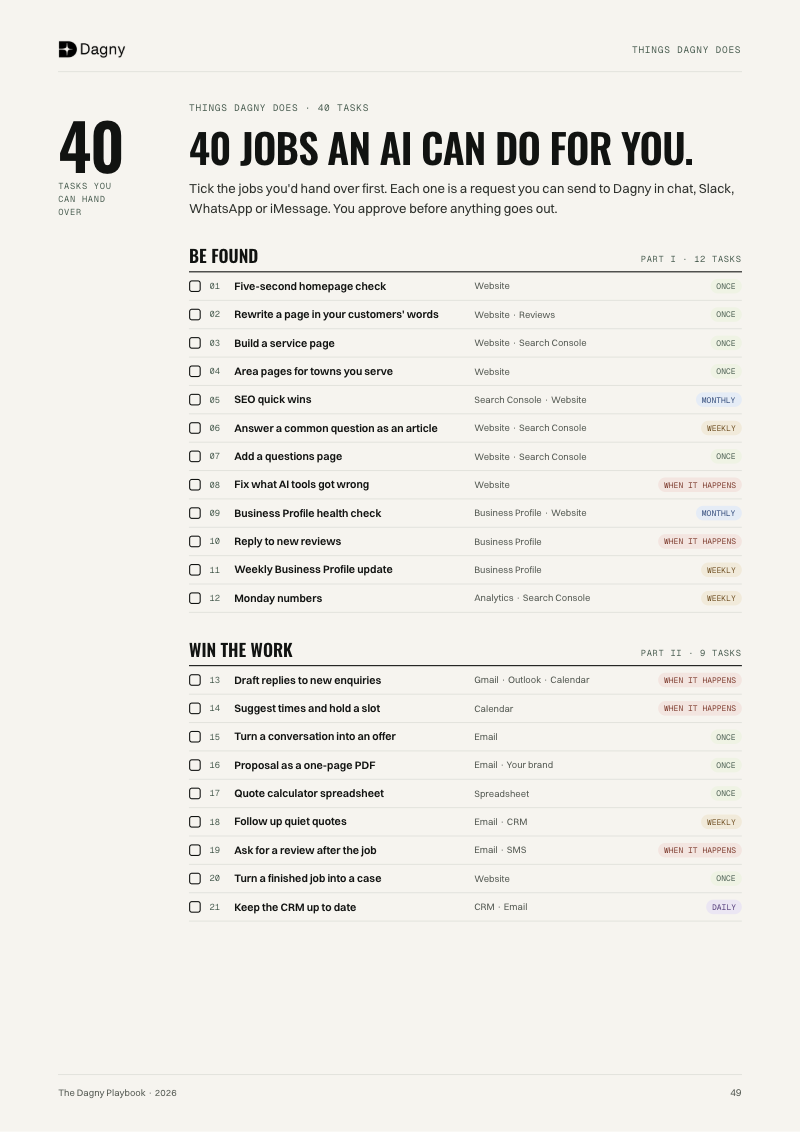
Take it with you
Free PDF · 51 pages
The whole playbook, in one PDF.
Four parts, 20 sections, the worksheets and the 40-task checklist. Read offline, print, or pass it on.51 pages to read offline, print, or pass on to your team.